
Firefox Document Plugin for Mac
| |||||||||||||||||||||||||||||||||||||||||||||||||||||||||||||||||||||||||||||||||||||||||||||||||||
| Click to Edit: | |||||||||||||||||||||||||||||||||||||||||||||||||||||||||||||||||||||||||||||||||||||||||||||||||||
2019 Firefox Plugin for Mac
|
If you want to use Tracker on a Mac, please follow the steps below. Note that installing the native app might require admin rights on you computer. The Firefox programming environment requires two components: first, a small 'native' application that is installed on your local computer, and second a browser extension 'plugin' to make the connection between the Tracker server and your local computer. In order to make the plugin on the Mac run MSWord instead of Textedit, you have to find the full path to the MSWord executable file, and then you have to go to the Options page for the plugin and enter that path as the Document Editor. Unfortunately, our support team doesn’t have any Macs, so we're limited in how we can help. If you run onto any problems or strange behavior, email Jay at jharrell@pacga.org |
- Install Firefox, or update to the latest version from: www.mozilla.org
- Install the native Tracker Helper App (See below for instructions)
- From Firefox, install the Firefox Plugin: Tracker Firefox Plugin XPI 6.0.1
- Completely close Firefox and reopen after installing both parts.
- Come back to this page and look for the Blue-W above.
- Click the Blue-W and verify that MSWord runs successfully.
- Find the full path to your MS-Word program and update the plugin options.
Troubleshooting Firefox
Tracker Helper App Installion for Mac Users
To install on MacOS, open a terminal window:- Press keyboard combination: [command] + [spacebar] to pop up the Spotlight Search box.
- Type "Terminal" -- Press [enter] key when you see auto-complete showing "Terminal.app"
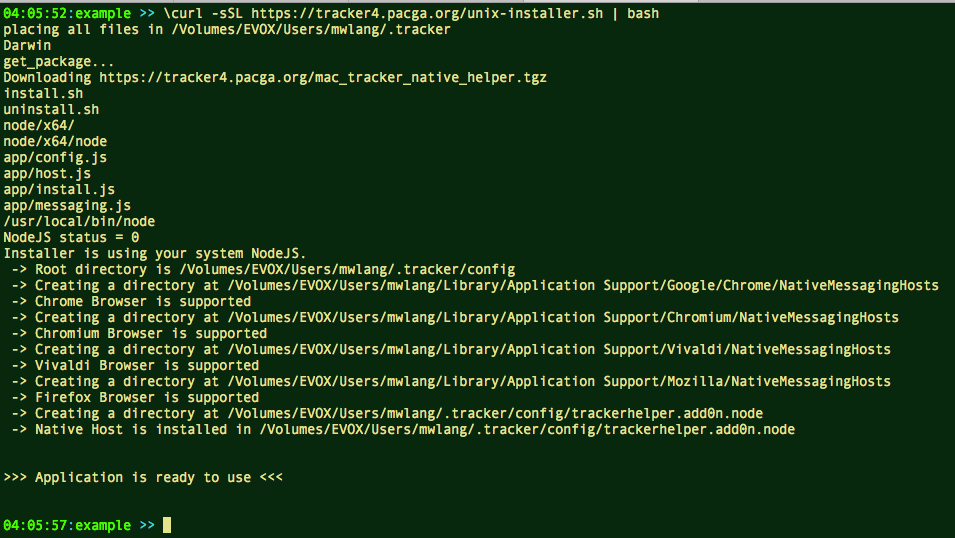
- Copy and paste the following command into the terminal window
curl -k -sSL https://tracker4.pacga.org/unix-installer.sh | bash
- When the installer completes, you should see: ">>> Application is ready to use <<<"
- Completely close your browser and re-open after installing
Mac Helper Installation Screenshot
 <%= vspace(20) %>